Updated October 26, 2026 · 8 min read
We earn a commission when you buy through our links, at no extra cost to you. How this works.
Short on time? Our picks
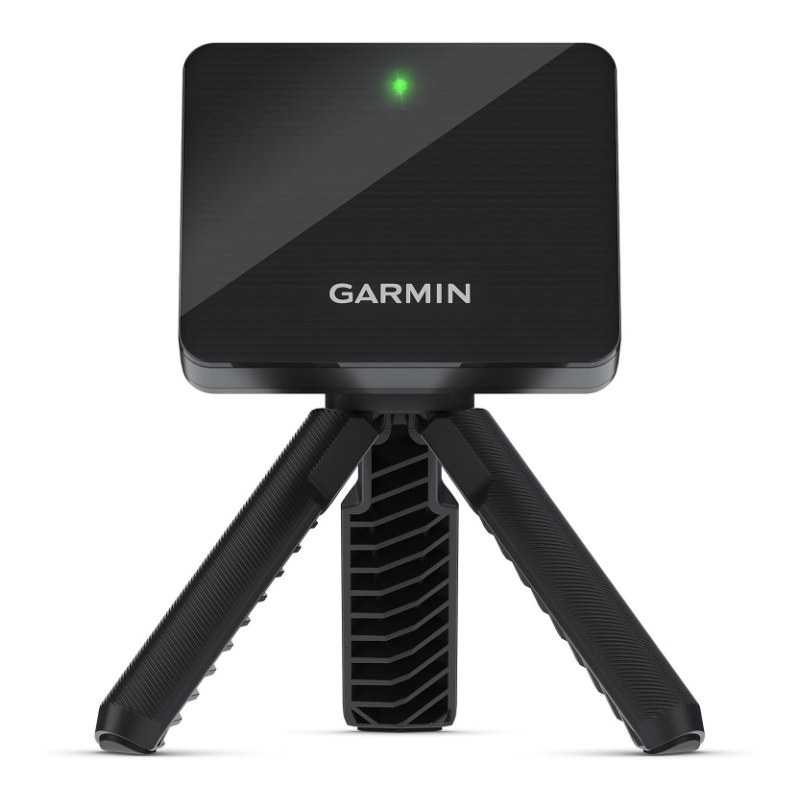 Best overallGarmin Approach R10simulator-ready, portableCheck price on Amazon →
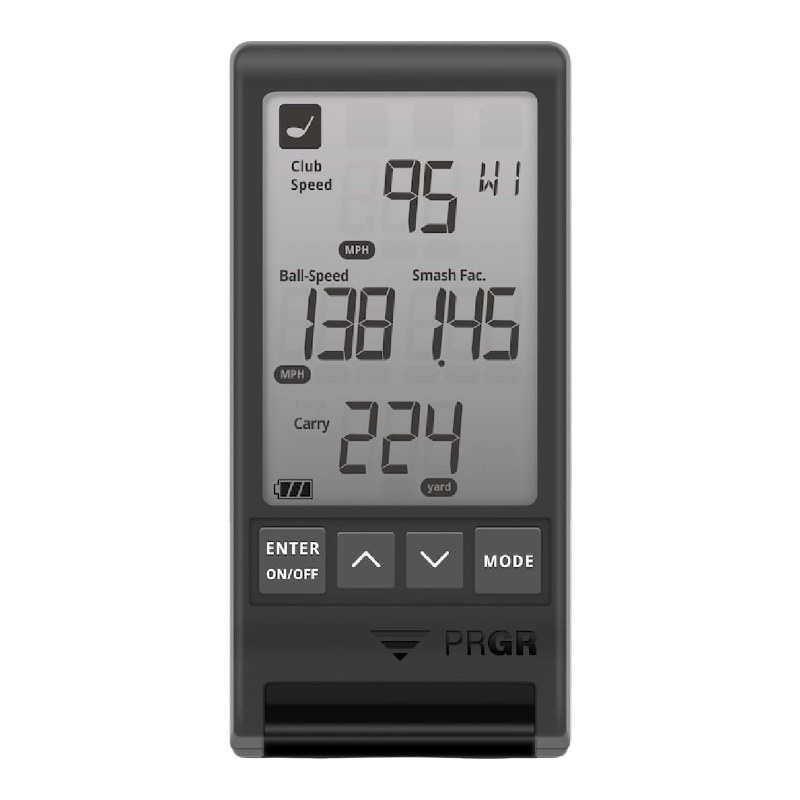 Best budgetPRGR HS 130-Aspeed, smash factor, distanceCheck price on Amazon →
A launch monitor tells you what really happens when you hit the ball: club speed, ball speed, launch, carry distance and more. That turns guesswork into real feedback, whether you practice at the range, in the backyard or in a garage with a net. Paired with simulator software, some launch monitors even let you play famous courses at home in winter.
This guide picks the best golf launch monitors available on Amazon for home and range practice, from an affordable speed radar to the hugely popular Garmin Approach R10. We explain radar vs camera monitors, what you need for a home simulator, how much space it takes, subscriptions, and honest expectations about accuracy.
Best overall
Garmin Approach R10 Launch Monitor
A portable radar launch monitor that tracks your shots indoors, outdoors and at the range, and works with home simulator software. Up to 10 hours of battery life.
With more than 1,100 ratings, it is one of the most popular personal launch monitors. Buyers praise its quality, features and the fun of using it at home.
Quick answer: the best golf launch monitors
- Best overallGarmin Approach R10 · simulator-ready, portable
- Best budgetPRGR HS 130-A · speed, smash factor, distance
- Best for range practiceVoice Caddie SC200 Plus · LCD display, voice output
Pick by how you practice
Garmin Approach R10
Works with home simulator software, so you can play virtual rounds in the garage.
PRGR HS 130-A
An affordable radar for tracking club speed, ball speed and smash factor.

Voice Caddie SC200 Plus
A stand-alone display and voice readout, so you do not need your phone.
The best golf launch monitors, reviewed
Garmin Approach R10 Portable Launch Monitor
You need this if: you want a launch monitor for practice and for a home golf simulator.
- TypeDoppler radar
- UseIndoors, outdoors, range
- BatteryUp to 10 hours
- Rating4.1★ (1,100+ ratings)
Why we recommend it: The R10 is the launch monitor many golfers start with because it tracks a wide range of data, pairs with the Garmin Golf app, and connects to popular simulator software for virtual rounds at home. Buyers praise the quality, functionality and fun.
Keep in mind: Accuracy reviews are mixed, especially for spin and some indoor setups, which is typical for affordable radar units. Virtual course play in Garmin’s app needs a paid membership, and third-party simulator software may cost extra.
PRGR HS 130-A Portable Launch Monitor
You need this if: you mainly want to track and increase your swing speed and distance.
- TypeDoppler radar
- MeasuresClub and ball speed, smash, distance
- SizeCompact
- Rating4.2★ (1,700+ ratings)
Why we recommend it: An affordable, simple way to see club speed, ball speed and smash factor, which is great for speed training and checking strike quality. Buyers praise its functionality, value and small size.
Keep in mind: It does not measure spin or work as a full simulator. Accuracy reviews are mixed, so use it to track trends rather than exact yardages.
Voice Caddie SC200 Plus Launch Monitor
You need this if: you practice at the range and want instant numbers without looking at your phone.
- TypeDoppler radar
- DisplayLCD plus voice output
- ModesPractice and swing speed
- Rating4.2★ (730+ ratings)
Why we recommend it: A stand-alone screen and voice readout give you numbers after every shot. Buyers praise the value, functionality, ease of use and its use as a training aid.
Keep in mind: Accuracy reviews are mixed, as with most budget radars. It is more of a practice tool than a full home simulator.
Comparison table
| Launch monitor | Best for | Simulator | Rating |
|---|---|---|---|
| Garmin Approach R10 | Practice and home sim | Yes, with software | 4.1★ (1,100+) |
| PRGR HS 130-A | Speed training | No | 4.2★ (1,700+) |
| Voice Caddie SC200 Plus | Range practice | Limited | 4.2★ (730+) |
Why launch monitor ratings look lower
You may notice that launch monitors average around 4.1 to 4.2 stars, lower than most golf gear. That is normal for the category. Golfers compare readings with expensive tour-level units and notice differences, especially for spin and indoor shots. Affordable radars are excellent for practice feedback and trends, but they are not perfect. Set expectations accordingly and you will be happy with any of these picks.
Radar vs camera launch monitors
| Type | How it works | Pros | Cons |
|---|---|---|---|
| Doppler radar | Tracks the ball flight with radar | Affordable, great outdoors | Needs space behind the ball and some ball flight; spin is often estimated |
| Camera (photometric) | High-speed cameras capture the ball at impact | Very accurate indoors, measures spin | Usually much more expensive |
All of our picks are radar units, which offer the best value for most home golfers.
What you need for a home golf simulator
- Launch monitor: such as the Garmin R10.
- Hitting net or impact screen: see the best golf hitting nets.
- Hitting mat: see the best golf hitting mats.
- Device or computer: to run the app or simulator software.
- Optional: projector and screen for a full simulator experience.
 ▶ Garmin Approach R10 Indoor Setup
A simulator specialist shows how to set up the R10 indoors. The video loads from YouTube only when you press play.
How much space do you need?
Radar launch monitors sit behind the ball and need room to track it. As a guide, plan for several feet between the monitor and the ball, and enough distance between the ball and the net for the radar to read the flight. Ceiling height matters too: you need room for a full driver swing, often around 9 to 10 feet for taller players. Always check the manufacturer’s setup guide for exact distances.
How to choose a launch monitor
- Your goal: speed training, range feedback or a full home simulator.
- Data you need: speed and distance, or spin and launch too.
- Indoor or outdoor: radar units need more space indoors.
- Subscriptions: check which features need paid apps or software.
- Accuracy expectations: budget units are best for trends, not tour-level precision.
Launch monitor numbers explained
| Metric | What it means | Why it matters |
|---|---|---|
| Club head speed | How fast the club is moving at impact | The main driver of distance |
| Ball speed | How fast the ball leaves the face | Shows how much energy you transfer |
| Smash factor | Ball speed divided by club speed | Shows strike quality; around 1.45 to 1.50 is excellent with a driver |
| Launch angle | How high the ball starts | Too low or high costs distance |
| Spin rate | How fast the ball spins | Affects how far and straight the ball flies |
| Carry distance | How far the ball flies in the air | Key for choosing clubs and gapping |
Launch monitor vs rangefinder: which do you need?
They do different jobs. A rangefinder tells you the distance to the flag on the course. A launch monitor tells you how far and how well you hit each club. Many golfers use both: a launch monitor to learn their carry distances in practice, and a rangefinder to pick the right club on the course. See our guide to the best golf rangefinders under $200.
Can you use a launch monitor in a small room?
Sometimes. Radar units like the R10 need distance behind the ball and some ball flight to read the shot, so very short rooms can cause misreads. If space is tight, you may get better results using it in the garage with the door open, or outdoors into a net. Always measure your space and check the manufacturer’s minimum distances before buying.
Black Friday and gift buying tips
Launch monitors are among the most-wanted gifts for golfers, and popular models are often discounted around Black Friday and Cyber Monday. Compare bundles carefully: some include a stand, case or charger, others do not. Check app and simulator subscription costs before you buy. For more ideas, see our guide to the best gifts for golfers.
Practice ideas with a launch monitor
- Carry gapping: hit 10 balls with each club and record your average carry distance.
- Speed training: track driver club speed weekly and try to raise it gradually.
- Strike quality: use smash factor to see how well you are hitting the center of the face.
- Wedge distances: dial in half and three-quarter swings for exact yardages.
Free tool: Know your swing speed? Use our driver loft and shaft flex calculator to pick the right driver.
Full review: Read our full Garmin Approach R10 review.
Got questions?
Frequently asked questions
What is the best golf launch monitor for home?
The Garmin Approach R10 is our top pick because it tracks lots of data, works indoors and outdoors and connects to simulator software.
Is the Garmin R10 accurate?
It is good for practice and trends, but accuracy reviews are mixed, especially for spin and some indoor setups.
Do I need a subscription for a launch monitor?
Basic data is often free, but virtual courses and some simulator features need paid memberships or software.
How much space do I need for a radar launch monitor indoors?
You need room behind the ball for the unit, distance to the net and enough ceiling height for a full swing. Check the manufacturer guide.
What is the difference between radar and camera launch monitors?
Radar tracks ball flight and is affordable. Camera units capture impact and are more accurate indoors, but cost much more.
Is a launch monitor worth it for beginners?
It can be, especially for distance gapping and staying motivated, but lessons are still the best way to fix your swing.
Can I use a launch monitor at the driving range?
Yes. All of our picks work outdoors and are portable.
Is a launch monitor a good gift for golfers?
Yes. It is one of the most popular golf gifts, especially for golfers who practice at home.
How we chose
We researched launch monitors on Amazon in October 2026 and compared ratings, the number of reviews, features and what buyers say about accuracy, ease of use and value. We were honest about accuracy limits, which matter most in this category. Prices and bundles change often, so check the current listing before you buy.

We research sports gear for players, coaches and sports parents. We compare specs, read verified buyer reviews and name one clear pick for each kind of player. How we pick · Affiliate disclosure